Java Photo Album
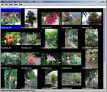
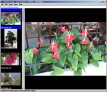
JPhotoAlbum is a Java desktop application for
quickly browsing, organizing and commenting digital photographs and
publishing the resulting albums as web pages. Albums are saved in XML
formatted files which are transformed to HTML with XML stylesheets.
The photos in photos.jpkware.com
have been organized and published using this program.
January 2020 Update: world has changed, the old app was was not
compatible with new Java. The updated sources compatible
with Java 8 and 11 are available in
github.
You can download the latest full jar and run it with java (double clicking the jar should work on windows).
See the Help/Contents in the program menu to get started with the
program!
Version history
- 1.5.0 Java 8 and 11 compatible version with maven build
- 1.4.5 Added minimum limit of 360 pixels in shorter dimension to make panoramas look better.
- 1.4.4 Added "h" command line export flag to allow HTML export without image loading.
- 1.4.3 Added sharpening of output photos using the UnSharpMask library by Janne Kipinä.
Some more EXIF fixes to make Bibble generated JPGs work better.
- 1.4.2 Some EXIF fixes to make Bibble generated JPGs work better.
- 1.4.1 Fix the EXIF width/height if mismatching with real dimensions when loading the full image.
Some fixes in exported slideshow.
- 1.4.0 Added File/Export Slideshow, thanks to Zbynek Mu��k.
Ask user what to do first when starting the program without an album name on command line.
- 1.3.1 File/Import shows small thumbs by default, and zoomed thumbnail when selected.
Thumblist receives focus when the dialog opens. Detect and fix web sizes if EXIF size is
different from real image size.
- 1.3.0 First release under GNU Public License, added Licence text to Help.
- 1.2.9 Fixed a caching bug in Save As.
- 1.2.8 Fixed bug in jphoto.js, added getPhotoHeading() to jphotoframe.xsl.
- 1.2.7 File/Import photos now uses a custom browser with thumbnail
preview. Remember last photo import directory.
- 1.2.6 Added Copy and Watermark originals.
- 1.2.5 Added Export Index of All Linked Albums. Modified Javascripts and
templates.
- 1.2.4 Fixed JavaScript problems with Mozilla versions less than
1.6. Photo filename is also shows in white when selected photo has no
explanation. Command line command export can now be appended with
export method shortcut numbers to use only those export methods.
Moved JavaScripts used in Thumbnails to parent frame.
- 1.2.3 Fixed a few additional bugs in album linking and loading.
Reordered page menu. Fixed non-black-and-white foreground and background
colors, changed default colors to be black on a bit yellowish white.
Prevented multiple simultaneous exports. Save album before export only if
album modified or no name. Framed album now uses JavaScript to implement
next/previous links and colors on image frame, and the frame is also
generated with a stylesheet.
- 1.2.2 Export will now save JPH file before export. Optimized web
thumbnail generation. Export 3 works with album links, export 4 disabled
for now. HTML file naming convention changed, old albums should be re-exported.
Added saving page defaults. Show watermark on preview screen, too.
- 1.2.1 Changed albumlink element format, old linked files may not work.
Publish options 1 and 2 now have initial support for album links (cross
folder links will still fail, and cover photo is not shown).
- 1.2.0 Added links between albums and Cover photo selection. Also change
frame icon to reflect selected cover photo (uses first photo if none
selected).
- 1.1.9 Added Export as Framed HTML.
- 1.1.8 Generate display thumbnails with drawImage() instead of
the slow (sometimes VERY slow) getScaledInstance() method. Added
"Find original photos".
- 1.1.7 Subtitled images are named "albumnameNNN.ext" where the NNN
is the index of the photo in the album. This way they are shown in
album order even if the player reorders them by file name. Added
text elements without an image.
- 1.1.6 Fixed scrollpane initial size problems. Drop to fullview
panel works, too.
- 1.1.5 Added Import photo directory.
- 1.1.4 Show full path in status line. Enter/double click on photo
shows it in a full screen view. "show" command line option added.
Cache thumbnails and last full size photo with soft references. Added
a few missing dispose() calls. Keep small images in normal size in
full screen view. Handle GIFs correctly, and accept them from drops,
too.
- 1.1.3 Load thumbs in a background thread, also generate thumbs for
files without Exif info. Show description (if defined) in thumbnail
instead of file name. Remember JPG import directory during one session.
- 1.1.2 Fixed help and table export with web start. Moved subtitles
30 pixels right to compensate some TV's off-center display, increased
font size. Added "export *.jph" command line option.
- 1.1.1 Fixes, watermark added.
- 1.1.0 Multiple photos can be selected, dragged, cut, copied and
pasted. Support for Java Web Start. Export subtitled is useful to
display photos on TV. Author contact information changed.
- 1.0.3 Initial release to web
JPhotoAlbum Copyright © 2005 Jari Karjala <www.jpkware.com>, Tarja
Hakala <www.hakalat.net>,
and Zbynek Mu��k.
The original JPhotoAlbum Java source code available in
SourceForge.net
The latest version is available in Github.com.